Monday, 6 January 2014

If You Need Runbase batch


1).dialog
2)getfromdialog
3)pack
4)unpack

1).Class declaration
str Name;
Dialogfield dfName;

//2).Cangobatchjournal
// True //return false means Batch Tab no need

3) dialog
;
dfName = dialog.addfieldvalue(types::string,Name);
return dialog;

4).getfromdialog
{
Name =dfName.value();
return super();
}

5)pack

6)unpack

7)run
Table t;
;
Runbasetable.Name =Name;
Runbasetable.insert();
EX:- Tutorial_Runbasebatch(class)
Imp methods:-
1)Main

2)Dialog

3)Getfromdialog

4)pack

5)unpack

6)cangobatchjournal

7)construct

8)run

9)discription

Dialogs


1) if You have 6-8 Unbound controls then we are creating Dialogs

2)Ok and Cancel Buttons are by defult on dialogs

3){
Dialog d = new Dialog("I am dialog ex");
Dialogfield dfName ,dfAccno;
;
dfName = d.addfield(Type::string ,"Name-lable",Name of the person-heldtext);
dfAccno = d.addfield(Typeid(CustAccno-EDT));
if(d.run())
{
info(dfName.value());
info(dfAccno.value());
}
else
{
throw error("");
}
}

Form calling sequence

Form calling sequence

1).when form is getting closed:
canclose method get call - can close return boolean true then only close method gets called
SQ:- Canclose()-Close().

2)Sequence of closing form using Ok command Button
SQ:- CloseOk()-Canclose()-Close.
Cancel command Button - save record property should be set to "NO".

3)Sequence of using Command button Cancel
SQ:-ClosedCancel()-Canclose()-Close().

4).When You Create a new record Using "Ctrl+N"
SQ:- Create of DS- Initvalue() of DS -Initvalue() of Table.

5)When user tries to delete a record from The Form
SQ:-Validate delete() of DS- Validate delete () of Table -Delete() of DS- Delete() of Table

6).Any critical Validation for The form alone
SQ:-Write The logic in The Validatedelete() of DS

7).When a record is Saved from the form
SQ:-Validatewrite() of DS- Validate write() of table- write() of ds -Write of Table() -Insert /Update of Table .

Enable/disable form controls (Active method)

1).From controls

purchline_Assettagno_ss3.enabled(false);
purchline_Assettagno_ss3.enabled(true);

2). we Can enable/disable buttons also write in init value/active method
if(cust.age>20)
{
Button .enabled(false);
}
else
{
Button.enabled(true);
}

Filteration Based on check box yes::no


1)Datasource Execute query:-


this.query().dataSourceTable(tablenum(PurchTable)).addRange(fieldnum(PurchTable,Processed_S3_FM)).value(queryValue(noYes::Yes));
super();


2).Write
PurchTable.Processed_S3_FM=noYes::Yes;

Friday, 3 January 2014

Ledger Accounts and Financial Dimensions

Ledger Accounts and Financial Dimensions: 

The concept of Ledger accounts and Financial Dimensions has been completely overhauled in Ax 2012. There is no more LedgerTable and LedgerTrans or Dimensions table.

MS has now introduced a concept of Segmented controls which is an integral part of Ledger accounts and dimensions now.
Ledger accounts in Ax 2012 have become Main accounts.
Now you will not be having  a ledger account alone, it will always be a combination of Main account and financial dimensions.
So for have your company books of accounts, you need to setup following:
  • Main accounts (base accounts that will hold all the books of accounts that can be applicable across the entire application (Table: MainAccounts that is company independent)
image
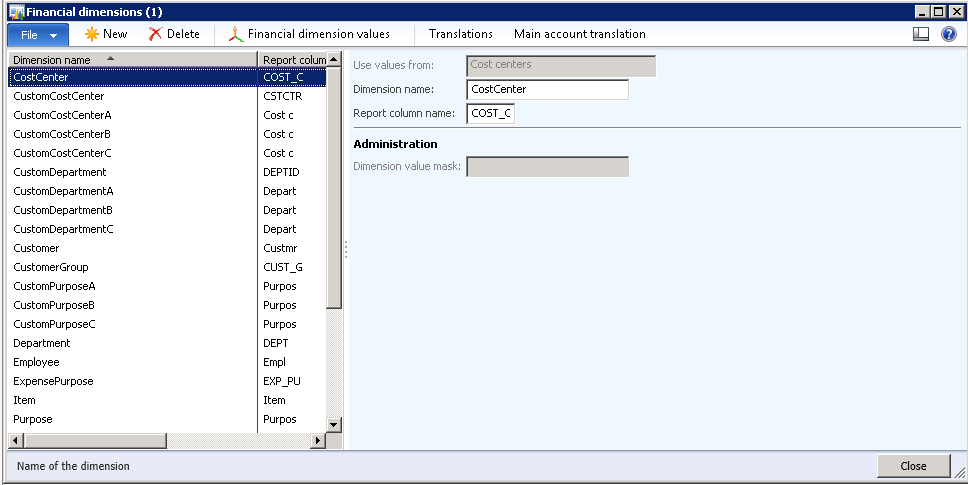
  • After creating Main accounts go ahead and create Financial Dimensions from GL –> Setup –> Financial dimensions –> Financial dimensions. The beauty here is that you can create as many financial dimensions that you need. No hassles of running the wizard and stuff. But technically handling these is a challenge at least in the beginning is what I feel. There has been introduction of whole lot of tables to handle dimensions. You can check the tables with names DimensionAttribute*. I will try and explain some of the tables as and when we come across them
image
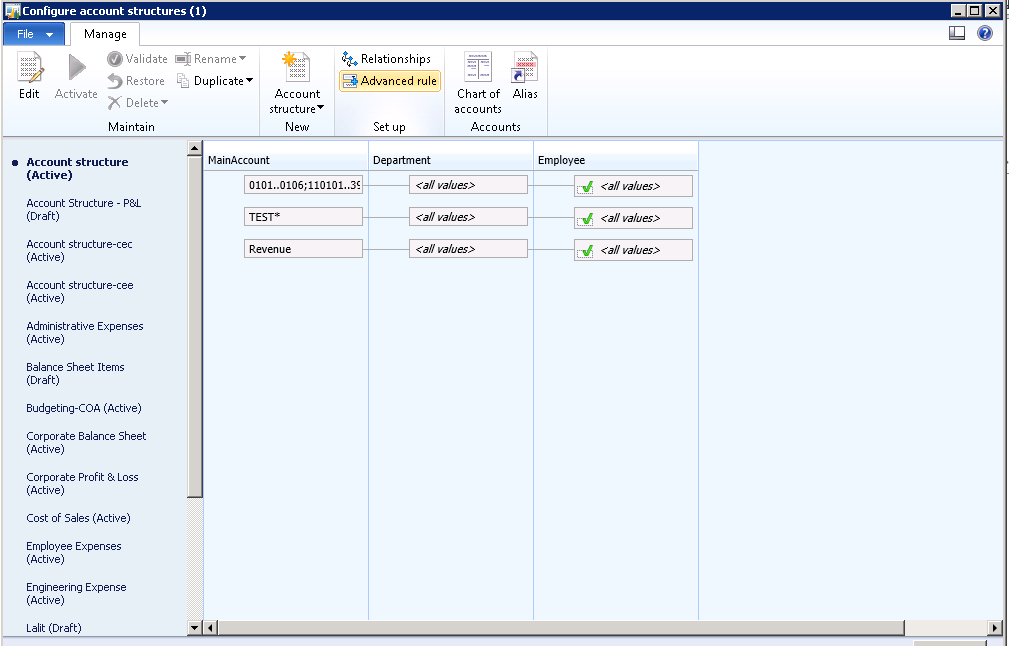
  • After creating Financial dimensions, go ahead and create account structures. These account structures contain the rules and combinations for Main accounts and dimensions. These account structures are then later used to define Chart of Accounts. You can create them from GL –> Setup –> Chart of accounts –> Configure account structures. An example account structure is shown below: Note that each account structure here defines the accounts applicable, and the dimensions applicable to them
image
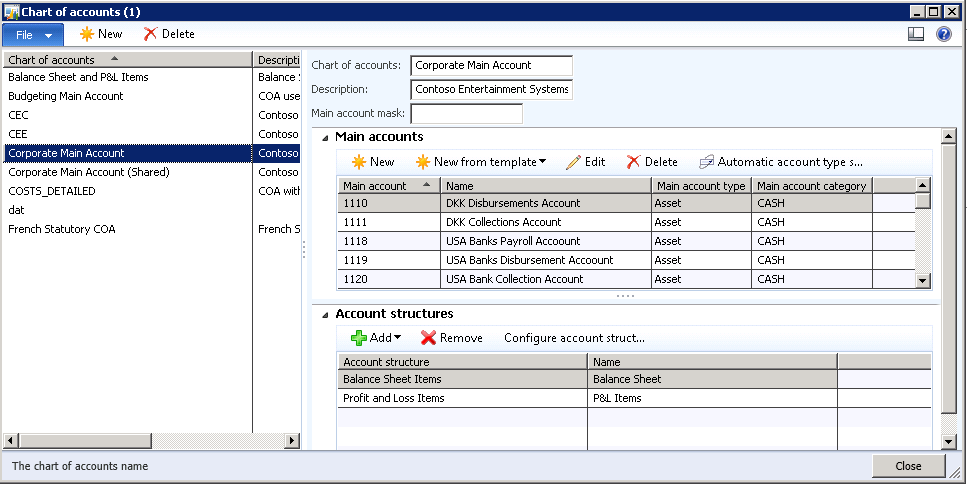
  • After the basic setup is done, you then need to go ahead and create Chart of Accounts. The chart of accounts includes the main accounts that are used for a particular chart of account, and the structure of combinations of main accounts and dimension values. The main accounts contain the financial data about the activity of the legal entity. You can set this up from GL –> Setup –> Chart of Accounts –> Chart of Accounts. These chart of accounts define the main accounts and dimensions applicable to a particular book of ledger for a company
image
  • Then go ahead and create a Ledger from GL –> Setup –> Ledger. A ledger is attached to one legal entity (Company in Ax 2009).
image
Now if you want to find out all the main accounts in a company (Legal entity in Ax 2012 parlance), then a developer needs to do following:
1. Find the Ledger record attached to a legal entity (Table: Ledger)
2. Then go ahead and find the Chart Of Account attached to a Ledger (Table: LedgerChartOfAccounts)
3. After that we need to traverse through main accounts using LedgerChartOfAccounts record (Table: MainAccounts)
That’s a bit of a work for developers.
Note: I have noticed that you will not be able to see the balances on chart of accounts after you post some transactions (at least I was not able to see). Then I did following and was able to see the transactions.
1. Go to GL –> Setup –> Financial dimensions –> Financial dimension sets.
2. Select the set with only Main account as the active dimension
3. Click on Rebuild balances / Update balances as applicable.

Tuesday, 24 December 2013

DialogEnumComboBox class in AX 2012 [X++, Restrict Enum elements in the dialog fields]

We all know there are various ways of doing this in AX 2009, but in AX 2012, We have a new class which will help to easily achieve this through DialogEnumComboBox class.

As you see below, the sales status drop down will only show the Canceled and Invoiced elements though the enum has more elements in it.
image
Now, lets see how to do this. Create class and methods as shown below.
public class TestDialogEnumComboBox extends RunBaseBatch
{
    DialogEnumComboBox  dialogEnumComboBox;
    DialogField         dialogType;
    DialogRunBase dialog;
    SalesStatus salesStatus;

    #define.FieldNoTmp(600)
}
public Object dialog()
{
    Set enumSet = new Set(Types::Enum);
    dialog = super();

    dialogType = new DialogField(dialog, enumStr(SalesStatus), #FieldNoTmp);   
    dialog.addCtrlDialogField(dialogType.name());
    dialogType.init(dialog);
    dialogType.label("Sales status");
    dialogType.helpText("Select sales status.");
    dialogType.value();

    enumSet.add(SalesStatus::Canceled);
    enumSet.add(SalesStatus::Invoiced);

dialogEnumComboBox = DialogEnumComboBox::newParameters(null, dialogType.control().id(), enumNum(SalesStatus), enumSet, dialog.form());

    return dialog;
}
public void dialogPostRun(DialogRunbase _dialog)
{
    super(_dialog);   
    _dialog.dialogForm().formRun().controlMethodOverload(true);
    _dialog.dialogForm().formRun().controlMethodOverloadObject(this);
    _dialog.formRun().controlMethodOverload(true);
    _dialog.formRun().controlMethodOverloadObject(this);

    if (dialogEnumComboBox)
    {
        // Specify the formRun (at this point the formRun is already available)
        // This is needed to track selection in the comboBox
        dialogEnumComboBox.parmFormRun(dialog.dialogForm().formRun());

        // Select a specific entry in the comboBox, if needed
        dialogEnumComboBox.select(SalesStatus::Invoiced);

    }
}
public boolean getFromDialog()
{
    boolean ret;
    ret = super();

    if (dialogEnumComboBox)
    {
        salesStatus = dialogEnumComboBox.selection();
    }
    return ret;
}
client server static ClassDescription description()
{
    return "DialogEnumComboBox example";
}
public static void main(Args _args)
{
    TestDialogEnumComboBox testDialogComboBox = new TestDialogEnumComboBox();

    if (testDialogComboBox.prompt())
    {
        testDialogComboBox.run();
    }
}
public void run()
{
    info(enum2str(salesStatus));
}

SQL/SSRS Interview questions I thought of blogging some SQL/SSRS interview questions.

Below are some. I will add more, when I complete the compilation 1. What is OLTP(Online Transaction Processing)? OLTP stands ...